


Connect your AI apps.
Work in Spillit.
Model Context Protocol (MCP) is a standard for connecting AI apps to tools. In Spillit, it lets compatible coding agents and other AI apps work with your files, notes, and tasks.
What MCP is for.
Ask for a source, a follow-up, or a finished document. Your AI app can use the tools and files in your Spillit workspace.
- CodexOpenAI
- Claude CodeAnthropic
- Other AI appsManual setup
SpillitExample request
“Get my workshop materials ready.”
- Room capacity foundVenue brief, page 2
- Follow-ups saved3 tasks in the Workshop project
- Handouts combinedOne searchable PDF copy
Choose one compatible AI app. Spillit checks access and asks for approval when required.
Work with your notes and plans.
Start a project with one request.
“Create a Saturday workshop project with a short brief. Add tasks to confirm the room layout and print twelve name tags.”
With Ask before changes on, review the proposed project, brief, and tasks before approving them in a compatible AI app.
Saturday workshop
Project brief
Codex Set up the room for twelve attendees and prepare their name tags.
- Confirm the room layout
- Print twelve name tags
Illustrated example. Select an AI app’s credit label in Smart Notes to highlight the exact text it added. Credits stay on this device.
Find source passages
Find quotes in Smart Notes and indexed PDFs with source references and PDF page numbers.
See the research examplePick up today’s work
Read today’s events, due tasks, and recently changed notes, then open the relevant project brief.
Explore ProjectsKeep the follow-ups you choose
Save a meeting recap and selected follow-up tasks in an existing project.
See the meeting exampleReview calendar suggestions
With Ask before changes on, review proposed events as a batch in a supported AI app.
See the calendar example
See the measured workflow results
Connected AI apps · Pro
Turn scans into one searchable PDF.
Ask your connected AI app to recognize text and combine the scans. Spillit runs the document steps on your computer and saves a new copy.
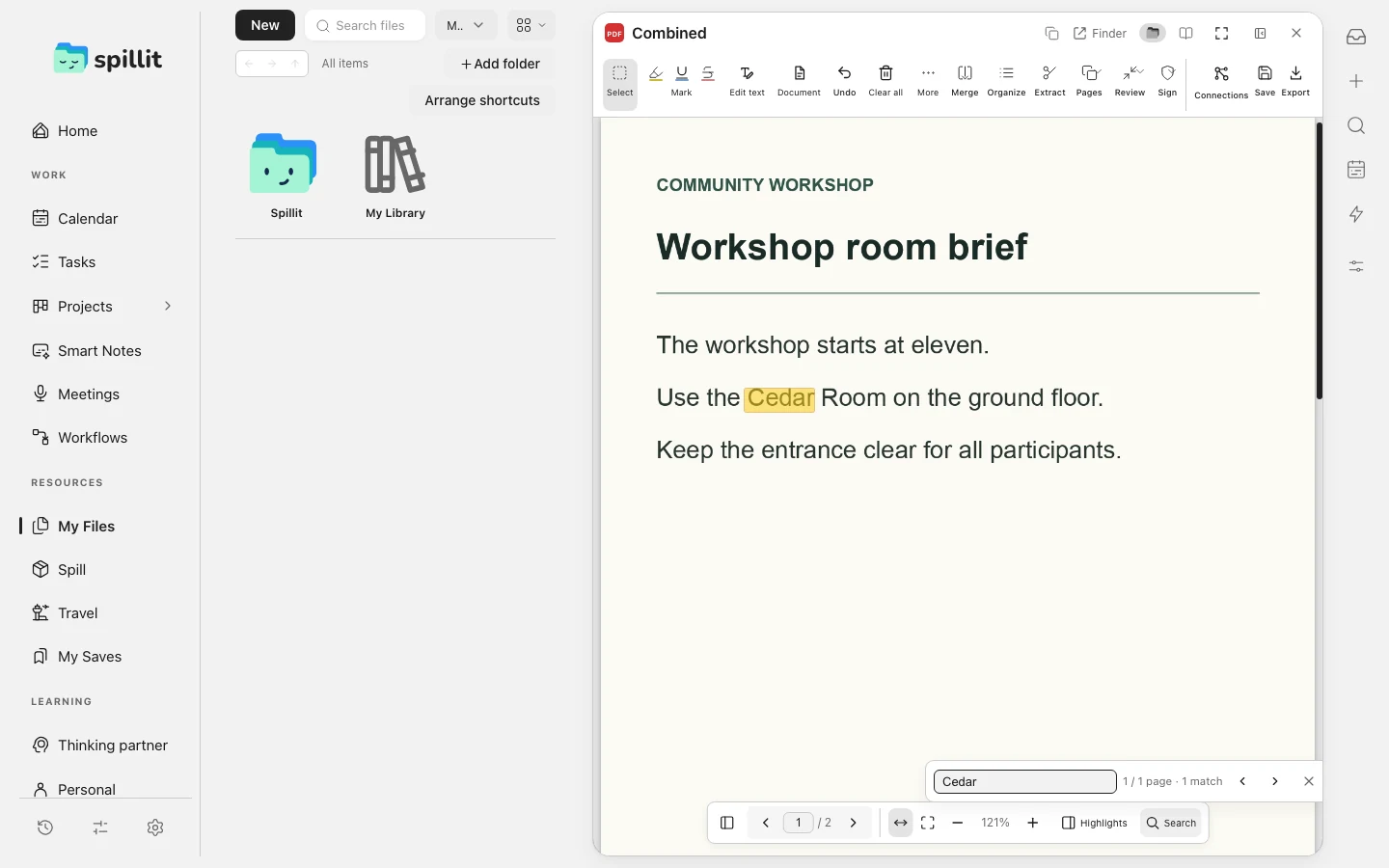
A separate desktop Workflows example combined two fictional scans. Searching for Cedar finds the text in the saved PDF.
Choose your scans
Pick the PDFs you want to use from My Files.
Review the steps
With Ask before changes on, approve the proposed job.
Open the result
Find a word in the new PDF and check the matching page.
Save a set of steps in desktop Workflows. A connected AI app can run that saved workflow on a PDF.
See how to save reusable stepsCompare measured AI workflows.
Claude Code and Codex ran 7 workflows with and without Spillit MCP. Each result comes from a single run.
Without MCP means Claude Code or Codex used terminal commands on local files without connecting to Spillit. With Spillit MCP, the same AI app used Spillit’s tools for the task. Difference compares token use and elapsed time against the run without MCP. Green means lower. Red means higher.
| Task |  Claude Code |  Codex | ||||
|---|---|---|---|---|---|---|
| Without MCP | Spillit MCP | Difference | Without MCP | Spillit MCP | Difference | |
| Trip, habit and noteChecked a trip, two itinerary activities, a habit check-in, and a note. | 26,2449.6 s | 15,2937.5 s | -42%-22% | 80,48727.6 s | 76,32417.5 s | -5%-37% |
| Save a source and its BibTeX fileSaved a source in a collection and exported a BibTeX file with one reference. | 34,57212.3 s | 14,9138.6 s | -57%-30% | 79,73222.1 s | 75,83518.0 s | -5%-19% |
| Edit, version, move, tag and export a fileEdited and moved a file, kept the previous version, added a tag, and exported the revision. | 45,10612.7 s | 29,88613.0 s | -34%+2% | 101,65136.7 s | 107,96019.6 s | +6%-47% |
| 31 calendar eventsChecked all 31 calendar events against the requested dates and agendas. | 30,93911.3 s | 20,69711.5 s | -33%+2% | 85,98335.4 s | 79,38914.0 s | -8%-60% |
| 4 events and 4 tasksChecked four calendar events and four follow-up tasks. | 26,6909.8 s | 15,3997.1 s | -42%-28% | 81,08829.4 s | 76,26916.4 s | -6%-44% |
| Cite a sentence from your notesChecked the exact quoted sentence and the title of its source note. | 24,9725.9 s | 14,1747.6 s | -43%+29% | 62,79912.3 s | 75,11110.0 s | +20%-19% |
| Create 3 and edit 2 Office filesChecked three new Office files and edits to two originals. | 71,93640.6 s | 40,39312.8 s | -44%-68% | 160,08354.6 s | 111,35420.1 s | -30%-63% |
| Setup | Claude Code | Codex |
|---|---|---|
| Trip, habit and noteChecked a trip, two itinerary activities, a habit check-in, and a note. | ||
| Without MCP | 26,2449.6 s | 80,48727.6 s |
| Spillit MCP | 15,2937.5 s | 76,32417.5 s |
| Difference | -42%-22% | -5%-37% |
| Save a source and its BibTeX fileSaved a source in a collection and exported a BibTeX file with one reference. | ||
| Without MCP | 34,57212.3 s | 79,73222.1 s |
| Spillit MCP | 14,9138.6 s | 75,83518.0 s |
| Difference | -57%-30% | -5%-19% |
| Edit, version, move, tag and export a fileEdited and moved a file, kept the previous version, added a tag, and exported the revision. | ||
| Without MCP | 45,10612.7 s | 101,65136.7 s |
| Spillit MCP | 29,88613.0 s | 107,96019.6 s |
| Difference | -34%+2% | +6%-47% |
| 31 calendar eventsChecked all 31 calendar events against the requested dates and agendas. | ||
| Without MCP | 30,93911.3 s | 85,98335.4 s |
| Spillit MCP | 20,69711.5 s | 79,38914.0 s |
| Difference | -33%+2% | -8%-60% |
| 4 events and 4 tasksChecked four calendar events and four follow-up tasks. | ||
| Without MCP | 26,6909.8 s | 81,08829.4 s |
| Spillit MCP | 15,3997.1 s | 76,26916.4 s |
| Difference | -42%-28% | -6%-44% |
| Cite a sentence from your notesChecked the exact quoted sentence and the title of its source note. | ||
| Without MCP | 24,9725.9 s | 62,79912.3 s |
| Spillit MCP | 14,1747.6 s | 75,11110.0 s |
| Difference | -43%+29% | +20%-19% |
| Create 3 and edit 2 Office filesChecked three new Office files and edits to two originals. | ||
| Without MCP | 71,93640.6 s | 160,08354.6 s |
| Spillit MCP | 40,39312.8 s | 111,35420.1 s |
| Difference | -44%-68% | -30%-63% |
Local workflow measurements
Five tests measured requests, local execution time, and available approval counts for separate calls and grouped workflows.
| Workflow | Requests | Prompts | Median time |
|---|---|---|---|
| Calendar batch31 events saved | 31 → 1 | 31 → 1 | 11.151 s → 0.508 s |
| Meeting follow-upSummary and 12 tasks saved | 15 → 1 | 14 → 1 | 4.752 s → 0.797 s |
| Split PDFs, recognize text, and mergeFour searchable pages in order | 3 → 1 | 3 → 1 | 4.643 s → 2.468 s |
| Cited researchSix quotes and citations preserved | 13 → 1 | No data | 3.423 s → 0.501 s |
| Office creation and editingThree files made and two edited | 18 → 1 | 8 → 1 | 6.780 s → 1.082 s |
The test answered approval prompts automatically. Times cover local execution and exclude model response and human review.
How we measured
Both setups used the same task files. Without MCP, the clients used terminal commands to work in a local folder. Spillit MCP ran on an isolated copy of a real library, with linked files redirected into that copy.
The prompts described each task without naming tools. Claude Code used Sonnet 5.5. Codex used gpt-6.1-sol. Both used medium reasoning effort.
Every Spillit MCP run passed its output checks. Full access let Spillit run requests without approval prompts. Codex’s Office result without MCP comes from a verified follow-up run using installed Python libraries for Office.
Tokens are the units AI apps count for input and output. Totals include reused input, which providers may bill at a different rate. Elapsed time can vary between runs.
How the agent hands off the work
A tool call is a request from the AI app to Spillit. The agent can send several document steps in one job.
list_document_steps- Look up available steps and their options.
start_document_job- Send the files and ordered steps to Spillit.
check_document_job- Check a running job or get its results.
In a separate local PDF test, combining three steps took one tool call and one approval. Running the steps separately took three calls and three approvals.
See the separate PDF workflow test
See example document tool calls
These examples show what an AI app can send to start_document_job. File names refer to documents in the Spillit library.
Make scans searchable and merge them
{
  "file_names": [
    "scan-01.pdf",
    "scan-02.pdf"
  ],
  "steps": [
    {
      "op": "searchable"
    },
    {
      "op": "merge",
      "name": "Searchable packet"
    }
  ],
  "request_id": "example-merge-scans"
}
Split a PDF and convert the parts to Word
{
  "file_names": [
    "irs-p17-142pages.pdf"
  ],
  "steps": [
    {
      "op": "split",
      "pages_per_file": 30
    },
    {
      "op": "pdf-word"
    }
  ],
  "request_id": "example-split-to-word"
}
Compress a PDF to a target size
{
  "file_names": [
    "big-scan-40pages.pdf"
  ],
  "steps": [
    {
      "op": "compress",
      "max_mb": 9.9
    }
  ],
  "request_id": "example-target-size"
}
Connect the AI app you use.
Spillit Pro includes MCP on supported desktop builds.
Read the setup and developer docsSet up in Spillit
Open Settings → Connections → AI connections. Select Connect beside Codex or Claude Code, then start a fresh session in that app.
Connect another compatible app
Use a client that can start a local MCP server. It sends requests through standard input and output, called stdio.
In your client’s configuration, use the Spillit backend executable as the command and pass --mcp as an argument.
Choose what AI apps can read or change. Ask before changes requires a client that can show approval prompts. Your AI provider may process content the app reads.